
MongoDB 与 Go 操作 MongoDB
MongoDB与Go操作MongoDB
mongodb官网:https://www.mongodb.com/
一、安装与启动MongoDB
下载地址:https://www.mongodb.com/try/download/community
windows安装直接到下载地址中点击下载就行了,这里主要讲Linux下载安装步骤
1、下载
CentOs
# 下载
wget https://fastdl.mongodb.org/linux/mongodb-linux-x86_64-rhel70-5.0.9.tgz
# 解压
tar -xzvf mongodb-linux-x86_64-rhel70-5.0.9.tgz
# 移动到 /usr/local 目录下
mv mongodb-linux-x86_64-rhel70-5.0.9 /usr/local/mongodb
2、修改系统配置文件
# 编辑 /etc/profile 文件
vim /etc/profile
# 将如下内容加入到文件末尾
export MONGODB_HOME=/usr/local/mongodb
export PATH=$PATH:$MONGODB_HOME/bin
# 刷新系统配置文件
source /etc/profile
3、检查系统配置是否生效
# 输入
mongo
# 显示版本和一些连接信息
MongoDB shell version v5.0.9
connecting to: mongodb://127.0.0.1:27017/?compressors=disabled&gssapiServiceName=mongodb
Error: couldn't connect to server 127.0.0.1:27017, connection attempt failed: SocketException: Error connecting to 127.0.0.1:27017 :: caused by :: Connection refused :
connect@src/mongo/shell/mongo.js:372:17
@(connect):2:6
exception: connect failed
exiting with code 1
4、添加一些文件
1.数据保存文件
cd /usr/local/mongodb/bin
mkdir data
2.日志输出文件
cd /usr/local/mongodb/bin
mkdir logs
cd logs
touch mongodb.log
3.mongodb配置文件
新建文件mongodb.conf,添加如下内容:
#数据库路径
dbpath=/usr/local/mongodb/bin/data
#日志输出文件路径
logpath=/usr/local/mongodb/bin/logs/mongodb.log
#错误日志采用追加模式
logappend=true
#启用日志文件,默认启用
journal=true
#这个选项可以过滤掉一些无用的日志信息,若需要调试使用请设置为false
quiet=true
#端口号 默认为27017
port=27017
#允许远程访问
bind_ip=0.0.0.0
#开启子进程
fork=true
#开启认证,必选先添加用户,先不开启(不用验证账号密码)
#auth=true
5、启动&查看
# 后台运行
mongod --config /usr/local/mongodb/bin/mongodb.conf

# 查看27017端口
netstat -lanp | grep 27017
# 查看mongodb进程
ps aux | grep mongodb
启动成功后就可以使用工具(navicat、goland、vscode)进行连接了。
tips
如果启动时报错就将配置文件中的fork=true注释掉,这样错误会提示的更清晰,方便排查
6、关闭服务
mongod -shutdown -dbpath=/usr/local/mongodb/bin/data
结合以前的知识,我们可以将mongodb给systemd托管,这样启动停止就方便很多,还有systemd的进程守护
7、可视化工具
navicat 15+、 golang、 vscode 等
官方工具下载:https://www.mongodb.com/try/download/compass
8、其他系统安装
1、Debian
参考1:https://mongodb.net.cn/manual/tutorial/install-mongodb-on-debian/#install-mongodb-community-edition
参考2:https://cloud.tencent.com/developer/article/1174423
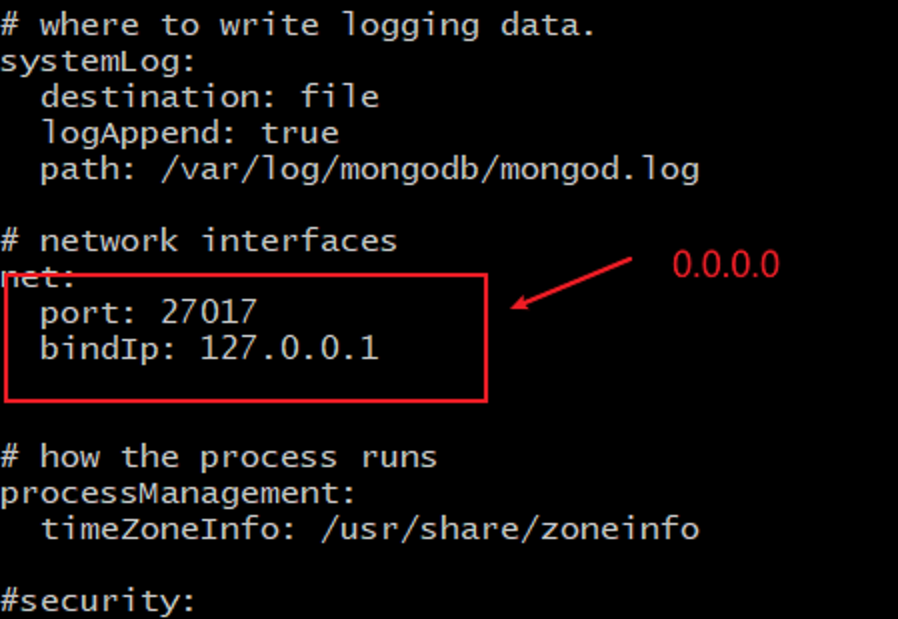
debian系统安装完成后直接是systemctl启动,如果需要能直连上,需要修改一下配置文件
nano /ect/mongodb.conf
# 将监听地址改为全0
bindIp: 0.0.0.0
二、常规操作
友情链接1:传送门
友情链接2:https://www.liwenzhou.com/posts/Go/go_mongodb/
三、go语言操作
参考资料:
1、https://mongodb.net.cn/manual/core/aggregation-pipeline/
我们使用官方的包
后面全部代码需要用到的引入
import (
	"go.mongodb.org/mongo-driver/bson"
	"go.mongodb.org/mongo-driver/bson/primitive"
	"go.mongodb.org/mongo-driver/mongo"
	"go.mongodb.org/mongo-driver/mongo/options"
)
1、连接数据库
func Connect() (*mongo.Client, error) {
	connect := options.Client().ApplyURI("mongodb://localhost:27017")
	client, err := mongo.Connect(context.TODO(), connect)
	if err != nil {
		return nil, err
	}
	//检查连接
	err = client.Ping(context.TODO(), nil)
	if err != nil {
		return nil, err
	}
	return client, err
}
连接:mongodb://127.0.0.1:27017/?replicaSet=rs0&readPreference=primary&ssl=false&connect=direct
2、查询
我们有一个测试库api-test里面有个测试集合0.0.0.0
数据格式示例:
{
  "host": "127.0.0.1:10000",
  "path": "/dr/1/",
  "name": "",
  "response": {
    "code": 200,
    "message": ""
  },
  "pattern": "/dr/1/",
  "createtime": {
    "seconds": 1656479991
  }
}
1.数量统计查询
func GetTotal(ctx context.Context, client *mongo.Client) (int64, error) {
	collection := client.Database("api-test").Collection("0.0.0.0")
	count, err := collection.CountDocuments(ctx, bson.D{})
	if err != nil {
		return 0, err
	}
	return count, nil
}
这里用到的是CountDocuments方法,bson.D是过滤条件,这里没有条件就给空,后面会详细介绍这个bson
众所周知
mongodb 查询数量这个方法在数据量特别大时查询速度非常慢,如果我们在不需要任何筛选条件的前台下,可以采用EstimatedDocumentCount方法取代CountDocuments。
2.分组查询
参考文档:https://www.mongodb.com/docs/manual/reference/command/aggregate/
假设我需要对response下面的code进行分组查询
获取这种字段用response.code
func GroupQuery(ctx context.Context, client *mongo.Client) (results []bson.M, err error) {
	collection := client.Database("api-test").Collection("0.0.0.0")
	pipeline := mongo.Pipeline{
		//1.$group为分组固定写法
		//2."_id"是固定写法,会根据后面的字段进行分组,字段必须$开头
		//3.total为自定义的键,$sum为统计固定写法,1也是固定写法
		{{Key: "$group", Value: bson.D{{Key: "_id", Value: "$response.code"}, {Key: "total", Value: bson.D{{Key: "$sum", Value: 1}}}}}},
	}
	//这里得到的是一个游标
	cur, err := collection.Aggregate(ctx, pipeline)
	if err != nil {
		return nil, err
	}
    //因为得到的是list,所以循环
	for cur.Next(ctx) {
		var m bson.M  //如果业务需要可以自己构造结构体进行赋值
		if err := cur.Decode(&m); err != nil {
			return nil, err
		}
		results = append(results, m)
	}
	return results, nil
}
过滤条件先声明,再赋值写法
var pipeline mongo.Pipeline
pipeline = append(pipeline, bson.D{{Key: "$group", Value: bson.D{{Key: "_id", Value: "$response.code"}, {Key: "total", Value: bson.D{{Key: "$sum", Value: 1}}}}}})
如果需要对response.code和host两个字段进行分组查询
修改一下过滤部分
pipeline := mongo.Pipeline{
	{{Key: "$group", Value: bson.D{{Key: "_id", Value: bson.M{"host": "$host", "responseCode": "$response.code"}}, {Key: "total", Value: bson.D{{Key: "$sum", Value: 1}}}}}},
}
在mongodb中操作是可以在管道中传递的,就是说可以进行一系列操作
比如:我们想将host和path组合加上response.code进行排序统计结果,再按照结果进行排序
// 我们这里修改一下过滤部分
pipeline := mongo.Pipeline{
	//$project是固定写法,用于修改字段;hostPath为自定义键;$concat为连接字段的固定写法
	{{Key: "$project", Value: bson.D{{Key: "hostPath", Value: bson.D{{Key: "$concat", Value: bson.A{"$host","$path"}}}}}}},
	{{Key: "$group", Value: bson.D{{Key: "_id", Value: bson.M{"hostPath": "$hostPath", "responseCode": "$response.code"}}, {Key: "total", Value: bson.D{{Key: "$sum", Value: 1}}}}}},
		//$sort为排序固定写法,1表示从小到大,-1表示从大到小
	{{Key: "$sort", Value: bson.D{{Key: "total", Value: 1}}}},
}
提示
根据已知资料我得出分组查询只能有一个_id和自定义的统计字段
3.模糊查询
我们模糊匹配一下path有多少各带dr的
1、过滤查询
func LikeQuery(ctx context.Context, client *mongo.Client) (int64, error) {
	collection := client.Database("api-test").Collection("0.0.0.0")
	filter := bson.D{
		//不是聚合查询,字段都不需要$符号
		//$regex为固定写法,后面支持正则表达式
		{Key: "path", Value: bson.D{{Key: "$regex", Value: primitive.Regex{Pattern: ".*dr.*"}}}},
	}
	count, err := collection.CountDocuments(ctx, filter)
	if err != nil {
		return 0, err
	}
	return count, nil
}
提示
根据已知资料我觉得模糊查询只能支持string类型的字段
2、聚合查询
func LikeQuery(ctx context.Context, client *mongo.Client) (results []bson.M, err error) {
	collection := client.Database("api-test").Collection("0.0.0.0")
	pipeline := mongo.Pipeline{bson.D{
		{Key: "$match", Value: bson.D{{Key: "path", Value: bson.D{{Key: "$regex", Value: ".*.dr.*"}}}}},
	}}
	cur, err := collection.Aggregate(ctx, pipeline)
	if err != nil {
		return nil, err
	}
	for cur.Next(ctx) {
		var m bson.M
		if err := cur.Decode(&m); err != nil {
			return nil, err
		}
		results = append(results, m)
	}
	return results, nil
}
提示
模糊查询时当遇到正则关键字如:? 时,需要进行转义 \?
4.查询单条数据
func GetOne(ctx context.Context, client *mongo.Client) (bson.M, error) {
	collection := client.Database("api-test").Collection("0.0.0.0")
	filter := bson.D{
		//$eq为固定写法是等于的意思
		{Key: "host", Value: bson.D{{"$eq", "127.0.0.1:10000"}}},
	}
	var m bson.M
	err := collection.FindOne(ctx, filter).Decode(&m)
	if err != nil {
		return nil, err
	}
	return m, nil
}
先声明再赋值的写法
var filter bson.D
filter = append(filter, bson.E{Key: "host", Value: bson.D{{"$eq", "127.0.0.1:10000"}}})
说明
bson里有A D E M等等,具体是什么意思,大家可以去看一下代码
上面代码中的{}非常的多,但是不用轻易调整它们的位置,说不定就会报错,还找不到原因
5.区间查询
1、过滤查询
// >= 100 < 300
filter := bson.D{}
filter = append(filter, bson.E{
    Key: "response.code", Value: bson.D{
        {Key: "$gte", Value: 100}, {Key: "$lte", Value: 300},
    },
})
2、聚合查询
// >= 100 < 300
pipeline := mongo.Pipeline{
	bson.D{{Key: "$match", Value: bson.D{
		{Key: "response.code", Value: bson.D{{Key: "$gte", Value: 100}}},
		{Key: "response.code", Value: bson.D{{Key: "$lte", Value: 300}}},
	}}},
}
6.分页查询
方法一:
pipeline := mongo.Pipeline{}
pipeline = append(pipeline, bson.D{{Key: "$skip", Value: 1}})
pipeline = append(pipeline, bson.D{{Key: "$limit", Value: 10}})
提示
该方法需要单独查询总页数
① 使用CountDocuments查询总页数,该方法不能分组,在过滤条件复杂的情况下有些不支持
collection.CountDocuments(ctx, bson.D{})
② 使用Aggregate+count查询总页数(推荐)
pipeline := mongo.Pipeline{
    bson.D{{Key: "$match", Value: bson.D{{Key: "$eq", Value: bson.D{{"$eq", "127.0.0.1:10000"}}}}}},
    // 可以补充更多过滤条件
    bson.D{{Key: "$count", Value: "total"}},
}
collection.Aggregate(ctx, pipeline)
方法二:
pipeline := mongo.Pipeline{
    bson.D{{"$facet", bson.D{
        {"data", bson.A{
            // 其他条件往上加就行
            bson.D{{Key: "$skip", Value: 1}},
            bson.D{{Key: "$limit", Value: 10}},
        }},
        {"total", bson.D{{"$count", "total"}}}}},
    },
}
collection.Aggregate(ctx, pipeline)
提示
该方法在数据量大的时候不能排序,排序会导致查询速度非常慢
7.范围查询
// 查询状态码为 200 404 的集合
arr := []int{200, 404}
pipeline := mongo.Pipeline{
	bson.D{{Key: "$match", Value: bson.D{
		{Key: "response.code", Value: bson.D{{Key: "$in", Value: arr}}},
	}}},
}
8.组合查询
1、and
1.过滤查询
filter := bson.M{
"$and": []bson.M{
		{"host": "127.0.0.1"},
		{"path": "/api"},
	},
}
count, err := Collection.CountDocuments(ctx, filter)
2.聚合查询
pipeline := mongo.Pipeline{
	bson.D{{Key: "$match", Value: bson.M{
		"$and": []bson.M{
			{"host": "127.0.0.1"},
			{"path": "/api"},
		},
	}}},
}
cur, err := Collection.Aggregate(ctx, pipeline)
2、or
1.过滤查询
// 查询状态码在200~300 或 400~500 的数量
func Query(ctx context.Context, client *mongo.Client) (int64, error) {
	filter := bson.D{{Key: "$or", Value: bson.A{
		bson.D{{Key: "response.code", Value: bson.M{"$gte": 200, "$lt": 300}}},
		bson.D{{Key: "response.code", Value: bson.M{"$gte": 400, "$lt": 500}}},
	}}}
	collection := client.Database("api-test").Collection("0.0.0.0")
	count, err := collection.CountDocuments(ctx, filter)
	if err != nil {
		return 0, err
	}
	return count, nil
}
2.聚合查询
// 查询状态码在200~300 或 400~500 的集合
func Query(ctx context.Context, client *mongo.Client) (results []bson.M, err error) {
	pipeline := mongo.Pipeline{
		bson.D{{Key: "$match", Value: bson.D{{Key: "$or", Value: bson.A{
			bson.D{{Key: "response.code", Value: bson.M{"$gte": 200, "$lt": 300}}},
			bson.D{{Key: "response.code", Value: bson.M{"$gte": 400, "$lt": 500}}},
		}}}}},
	}
	collection := client.Database("api-test").Collection("0.0.0.0")
	cur, err := collection.Aggregate(ctx, pipeline)
	fmt.Println(cur)
	if err != nil {
		return nil, err
	}
	for cur.Next(ctx) {
		var m bson.M
		if err := cur.Decode(&m); err != nil {
			return nil, err
		}
		results = append(results, m)
	}
	return results, nil
}
3、新增
// data 是个json数据
collection.InsertOne(ctx, data)
// 批量插入
collection.InsertMany(ctx, data)
4、修改
// filter是过滤条件;data需要更新的json数据
collection.UpdateOne(ctx, filter, data)
// 多条更新
collection.UpdateMany(ctx, filter, data)
5、删除
1、根据id单个删除
func DeleteById(ctx context.Context, client *mongo.Client, id string) (bool, error) {
	xid, err := primitive.ObjectIDFromHex(id)
	if err != nil {
		return false, err
	}
	collection := client.Database("api-test").Collection("0.0.0.0")
	result, err := collection.DeleteOne(ctx, bson.D{{Key: "_id", Value: xid}})
	if err != nil {
		return false, err
	}
	if result.DeletedCount == 1 {
		return true, nil
	}
	return false, nil
}
2、根据多个id批量删除
// 示例:ids = "62d81a724f635f8d2ed1f961,62d81a724f635f8d2ed1f962"
func DeleteManyByIds(ctx context.Context, client *mongo.Client, ids string) (bool, error) {
	idArr := strings.Split(ids, ",")
	var xdiArr []primitive.ObjectID
	for _, id := range idArr {
		xid, err := primitive.ObjectIDFromHex(id)
		if err != nil {
			return false, err
		}
		xdiArr = append(xdiArr, xid)
	}
	collection := client.Database("api-test").Collection("0.0.0.0")
	result, err := collection.DeleteMany(ctx, bson.D{{Key: "_id", Value: bson.D{{Key: "$in", Value: xdiArr}}}})
	if err != nil {
		return false, err
	}
	if result.DeletedCount == int64(len(idArr)) {
		return true, nil
	}
	return false, nil
}
四、其他
1、常见问题
查询时如果遇到报错:
PlanExecutor error during aggregation :: caused by :: Sort exceeded memory limit of 104857600 bytes, but did not opt in to external sorting
大意是:排序超出了104857600字节的内存限制,但未选择外部排序
解决办法:
// 设置 allowDiskUse=true
opt := options.Aggregate().SetAllowDiskUse(true)
cur, err := Collection.Aggregate(ctx, pipeline, opt)
2、速查表
| mongodb写法 | 含义 |
|---|---|
| $gt | > |
| $gte | >= |
| $lt | < |
| $lte | <= |
| $eq | = |
| $ne | != |
| $in | in |
| $nin | no in |
| $or | or |
| $and | and |
| $group | group |
| $sum | sum |
| $concat | concat |
| $project | |
| $sort | sort |
| $limit | limit |
| $match | 匹配 |
| $set | |
| $exist | |
| $skip | 分页的数量 |
| $regex | 正则匹配 |
| $count | |
| $facet |